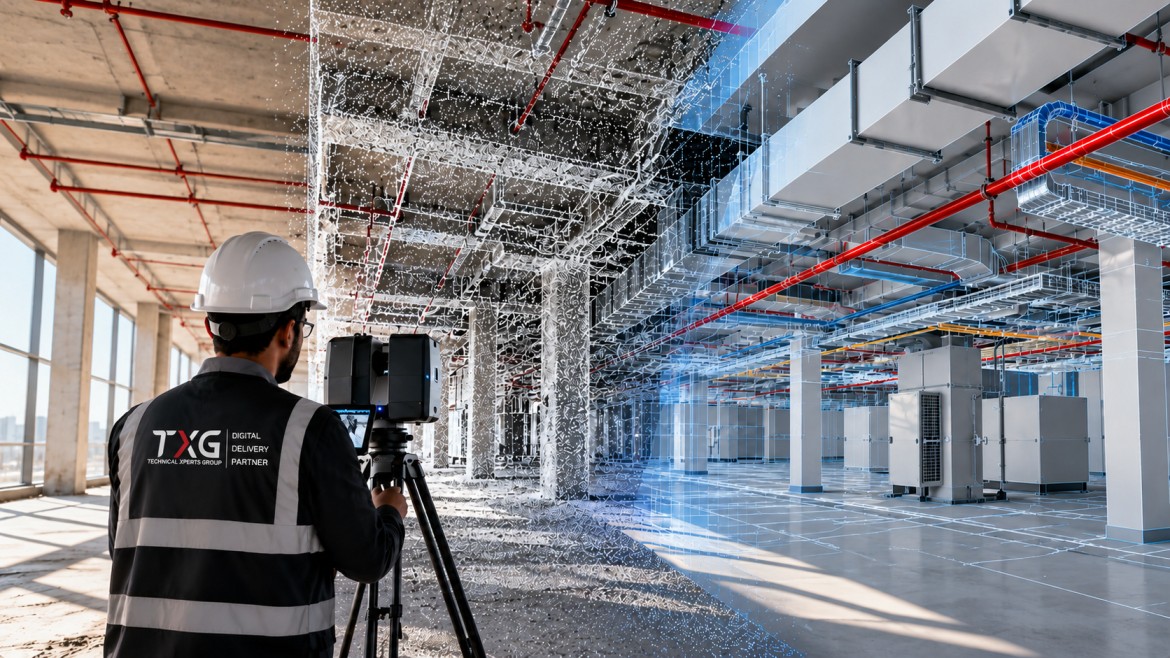
Renovating an existing building, upgrading its systems or planning new work inside an operating facility requires reliable information about current site conditions. Yet original drawings may be missing, outdated or different from what was actually built.
Scan-to-BIM helps address this challenge by using reality-capture data, such as laser scans, to develop a Building Information Modelling (BIM) model of existing conditions.
The process can provide project teams with a measurable digital reference for planning, coordination, refurbishment and asset documentation. However, the quality of the final model depends on the scanning plan, site conditions, processing methods, modelling requirements and quality checks.
This guide explains how Scan-to-BIM works, what affects accuracy, which deliverables to define and how to plan a project around its intended use.
What is Scan-to-BIM?
Scan-to-BIM is the process of capturing the physical conditions of a building or infrastructure asset and using the resulting data to create a BIM model.
A common approach uses laser scanning to collect millions of measured points from surfaces. These points form a point cloud, which represents the geometry of the scanned environment. The point cloud is then processed and used as a reference for creating selected model elements.
Depending on the project, those elements may include walls, floors, columns, beams, ceilings, ducts, pipes, equipment and other visible components.
The model is not automatically created in full detail simply because a scan exists. The required elements, level of geometric development, information fields and acceptance criteria must be defined for the intended use.
In simple terms: Scan-to-BIM turns measured information about an existing site into a structured digital model that project teams can use for defined design, coordination or asset-information tasks.
When is Scan-to-BIM useful?
Scan-to-BIM is particularly useful when teams need dependable information about existing conditions and cannot rely on drawings alone.
Building renovation: Capture existing geometry before designing alterations.
MEP upgrades: Document visible mechanical, electrical and plumbing systems to support coordination.
Facility documentation: Develop a digital record of selected building elements and spaces.
Extension or retrofit projects: Understand interfaces between existing structures and proposed work.
Heritage and complex structures: Record irregular shapes and architectural features where appropriate scanning methods can capture them.
As-built documentation: Compare captured conditions with available drawings or design information, using agreed verification procedures.
Suitability depends on access, required detail, safety conditions, project scope and whether the relevant surfaces and assets can be captured.
The Scan-to-BIM workflow: 6 key steps
1. Define the project requirements
Start by identifying how the model will be used. A model for early renovation planning may need different detail from one used for MEP coordination or asset handover.
Agree on the areas to be surveyed, the elements to be modelled, required accuracy, expected model development, information fields, delivery formats and acceptance criteria. Also identify any areas that cannot be accessed or scanned.
2. Plan the site survey
The survey plan determines where scanning equipment will be positioned and how scan coverage will be achieved. The team should consider site access, line of sight, reflective or transparent surfaces, obstructions, lighting where relevant to the capture method, operational restrictions and safety.
For larger or complex sites, multiple scan positions may be required. Survey control or reference points may also be used where the project requires the scan data to align with a known coordinate system.
3. Capture the existing conditions
Laser scanners collect spatial measurements from visible surfaces. Depending on the project, other reality-capture methods such as photogrammetry may complement the survey.
Coverage and data quality should be checked while the team is on site. Missing areas, obstructed equipment or insufficient detail may require additional capture before the survey is considered complete.
4. Register and process the point cloud
When several scans are collected, they may need to be aligned or registered into a common coordinate system. The data is then reviewed and processed for issues such as incomplete coverage, noise, stray points or alignment errors.
The project team should confirm how the processed data will be referenced and delivered, including any required coordinate system, units and file formats.
5. Develop the BIM model
Modellers use the processed point cloud as a reference to create the agreed BIM elements. Depending on the scope, the model may include architectural, structural or MEP components.
Not every scanned point becomes a model element. The team should model what is required for the agreed purpose and document any assumptions, exclusions or elements that could not be verified.
6. Validate and deliver the model
The final model should be checked against the agreed requirements. Validation may include comparing model geometry with the point cloud, reviewing coverage and checking required model attributes.
Deliverables should be reviewed for completeness, file compatibility, naming conventions and any project-specific acceptance criteria before handover.
What affects Scan-to-BIM accuracy?
Accuracy is not determined by the scanner alone. It depends on the full workflow, from field capture to model validation.
Scanner capability and settings
Equipment specifications, operating range, measurement conditions and selected settings influence the captured data.
Survey planning and scan coverage
Occluded areas and limited lines of sight can leave gaps. A good survey plan helps reduce missed surfaces.
Registration and alignment
Errors when combining multiple scans can affect the overall point cloud and the model created from it.
Site conditions and surface properties
Reflective, transparent, dark or difficult-to-access surfaces may affect capture quality depending on the equipment and method.
Modelling decisions
The modeller interprets point-cloud data to create defined elements. Simplification, assumptions and the agreed model scope influence how closely the model represents the captured conditions.
Quality assurance
Clear tolerances, suitable checks and documented acceptance criteria help determine whether the final deliverable meets the project requirements.
Important: No single accuracy figure applies to every Scan-to-BIM project. The required tolerance, and the method used to verify it, should be agreed according to the project's needs and the capabilities of the survey and modelling workflow.
Point cloud vs BIM model: What is the difference?
A point cloud and a BIM model are related, but they are not the same deliverable.
Point cloud
A collection of measured points representing captured surfaces.
Primarily records captured geometry and visible conditions.
Useful as a reference for measurement, verification and modelling.
May contain noise, gaps or points from temporary objects.
BIM model
A structured digital representation made from model elements.
Can include geometry plus structured element properties and information.
Useful for defined design, coordination, documentation and asset-information tasks.
Requires interpretation, modelling decisions and validation against the agreed scope.
A point cloud is often a key source for the model, but it does not replace a properly scoped and validated BIM deliverable.
What deliverables should be agreed before the project starts?
The deliverables should match the project's intended use. Depending on the agreed scope, a Scan-to-BIM package may include:
Registered or processed point-cloud files.
A BIM model covering the agreed building areas and elements.
Specified model formats and any required exchange formats.
Agreed coordinate system, units and reference information.
Required element properties or asset data, if included in scope.
Quality-check results or a record of verification against agreed tolerances.
A list of exclusions, inaccessible areas, assumptions and known limitations.
These items are not automatically included in every Scan-to-BIM service. They should be defined in the project scope, along with the expected level of model development, delivery schedule and acceptance criteria.
What affects the cost of Scan-to-BIM?
Scan-to-BIM costs vary because each site and deliverable has different requirements. Important cost drivers can include:
Site size and complexity: Larger or more complex environments may require more survey positions and processing.
Access and operating restrictions: Limited access, occupied spaces or restricted working hours can affect survey planning.
Required accuracy: Tighter tolerances may require more careful control, capture and verification.
Model scope: The number and type of elements to be modelled affect modelling effort.
Required LOD and information: More developed geometry and additional asset data may increase the work involved.
Deliverable formats and coordination: Special exchange requirements, validation reports or integration with existing project data can affect scope.
Programme: Short deadlines or phased deliverables may affect resourcing and planning.
A reliable quotation should be based on the survey area, site conditions, modelling scope, required accuracy, deliverable formats and schedule, not simply the floor area alone.
Common Scan-to-BIM mistakes to avoid
Starting the survey without agreeing on the intended use of the model.
Assuming that scanning every visible area is always possible.
Treating a point cloud as if it were already a complete BIM model.
Combining scans without checking registration quality and coordinate alignment.
Requesting a high level of model detail without defining which elements require it.
Failing to document inaccessible areas, assumptions or exclusions.
Accepting the model without agreed validation criteria.
Promising a specific accuracy level without a defined measurement and verification method.
Clear scope definition, careful survey planning and documented quality checks help reduce avoidable rework.
How to select a Scan-to-BIM provider
When evaluating a provider, project teams should look beyond the equipment or software being used. Ask how the provider will meet the project's actual requirements.
What survey method and equipment are proposed, and why are they suitable for the site?
How will scan coverage, registration and coordinate alignment be checked?
What accuracy or tolerance can be supported, and how will it be verified?
Which elements will be modelled, and what will be excluded?
What model development level and information fields are included?
What formats will be delivered, and can they be used within the project's workflow?
Will the provider document assumptions, limitations and quality checks?
Can relevant examples be shared with permission and without disclosing confidential project details?
Evaluate the answers against the project scope and evidence supplied. Avoid relying on unsupported performance claims or project examples that have not been approved for disclosure.
Frequently asked questions
1. What is Scan-to-BIM?
Scan-to-BIM is the process of capturing an existing physical environment, often with laser scanning, and using the resulting data to create a BIM model for a defined purpose.
2. What is a point cloud in Scan-to-BIM?
A point cloud is a collection of measured spatial points that represent visible surfaces captured during a survey. It is commonly used as a reference for developing and checking a BIM model.
3. Is a point cloud the same as a BIM model?
No. A point cloud contains captured measurement data, while a BIM model contains structured model elements and may include additional properties and information.
4. How accurate is Scan-to-BIM?
Accuracy varies with equipment, survey planning, site conditions, scan registration, modelling methods and verification. The required tolerance should be defined for each project and checked using an agreed method.
5. How long does a Scan-to-BIM project take?
Duration depends on site size, access, complexity, scan coverage, model scope, required detail and deliverables. A timeline should be estimated after reviewing these factors.
6. What files are delivered in a Scan-to-BIM project?
Deliverables may include processed point clouds, BIM model files, exchange formats and quality-check information. The exact package depends on the agreed scope.
7. Can Scan-to-BIM be used for MEP coordination?
Yes, when the survey captures the relevant systems and the model is developed to the required scope and accuracy. Hidden or inaccessible services may require other records or investigation.
8. What affects Scan-to-BIM cost?
Key factors include site size and complexity, access, required accuracy, model scope, level of development, asset information, file formats and schedule.
Conclusion
Scan-to-BIM provides a practical way to turn measured information about existing buildings and infrastructure into a structured digital model. It can support renovation, coordination, documentation and asset-information tasks when the model is developed for a clear purpose.
A successful project starts by defining the required areas, elements, accuracy, information and deliverables. It then relies on a planned survey, careful point-cloud processing, suitable modelling and validation against agreed criteria.
The goal is not simply to create a detailed model. It is to deliver reliable, usable information that meets the needs of the project team.
Planning a Scan-to-BIM project? Contact Technical Xperts Group to discuss your existing-site documentation, BIM modelling and information-delivery requirements.